Energy Retrofit Jobs Manager
The wider job-management platform that the Twilio field operations add-on can support.

Twilio Field Operations Add-On is a custom setup and integration service for trades, maintenance, retrofit, construction and field-service companies. It connects business phone numbers, staff mobiles, call forwarding, call logs, WhatsApp job dispatches and daily worker schedules into one practical admin dashboard.
A field service business was managing jobs, phone calls and worker updates across separate systems. Admin staff had to manually call or message workers when jobs changed, and there was no clear view of whether a schedule had been sent, read or changed after sending.
I built a Twilio add-on inside the existing job management platform. Admins can assign business numbers to staff, route incoming calls to mobiles, view call history, send job details by WhatsApp and push daily schedules to workers from the dispatch board.
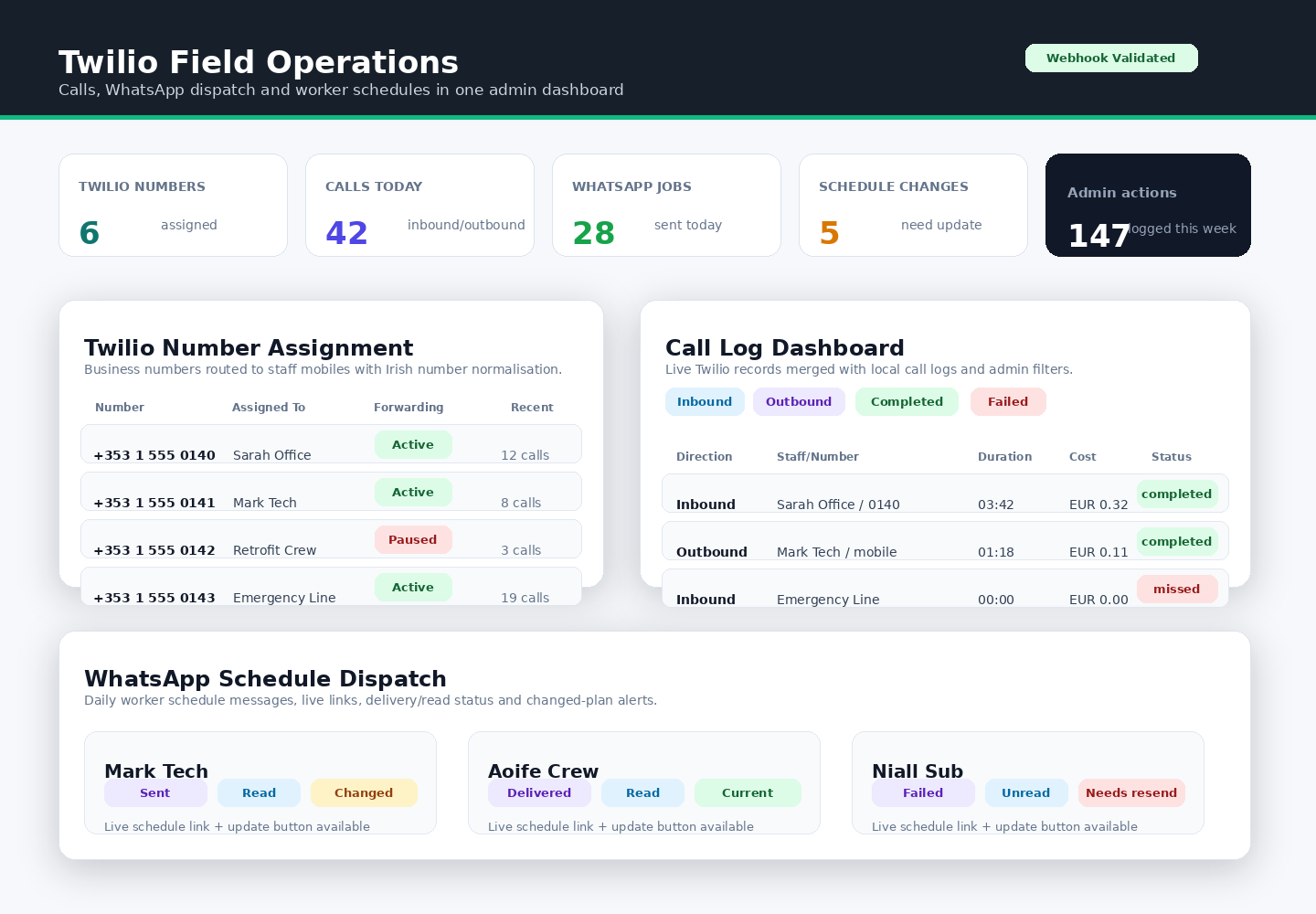
The routing layer assigns Twilio phone numbers to staff or technicians, forwards incoming calls to the correct mobile, normalises Irish mobile numbers automatically and protects inbound webhook traffic with Twilio request validation.
The admin dashboard shows inbound and outbound calls with filters for status, direction, phone number and date. It displays call duration, cost, SID and current call status, then combines live Twilio records with local call logs so the office has one call-history view.
Admins can add technicians, store or update mobile numbers, assign users to Twilio numbers and see recent call activity beside each number. This keeps the routing screen useful for day-to-day office work, not just initial setup.
Individual job details can be sent to the assigned worker by WhatsApp, including purchase order number, location, priority, task summary and a live job link. Where configured, the workflow can use Twilio WhatsApp templates and mark the tracker row as WhatsApp sent.
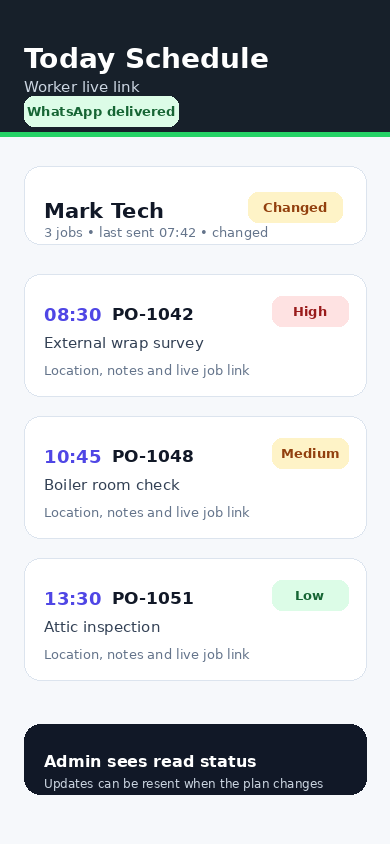
The dispatch board can send a full daily schedule to a worker with a live schedule link. Twilio delivery states such as sent, sending, delivered, read, failed and undelivered are tracked so the office can see whether the update reached the worker.
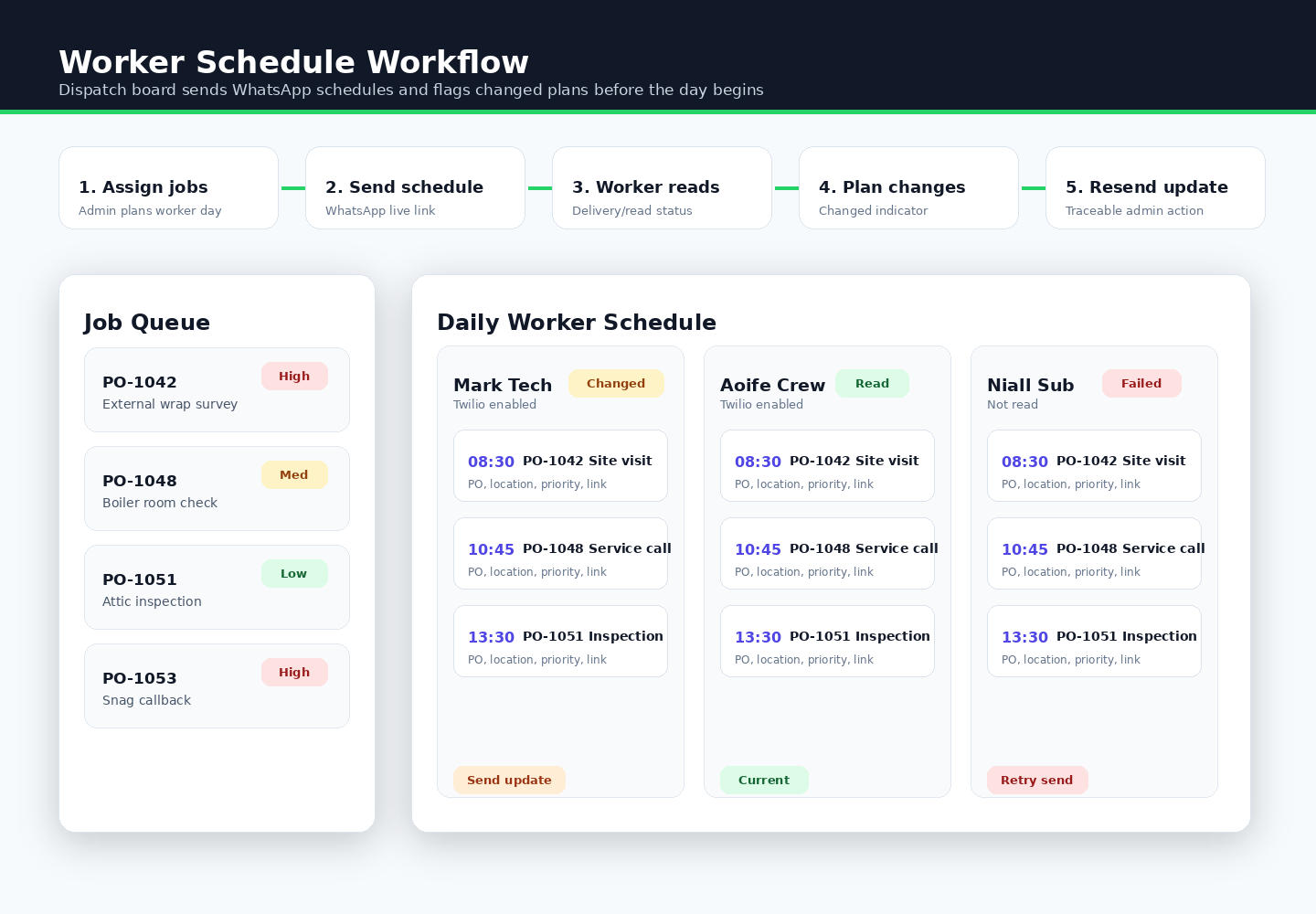
When jobs are moved, added or removed after a schedule has already been sent, the board can flag that the worker schedule changed. Admins can then send an update before the day starts instead of relying on memory or manual follow-up messages.
The board shows which workers are Twilio-enabled, whether their schedule was sent or read, whether it has changed, and whether a send failed. Failed WhatsApp sends expose the Twilio error in the admin workflow, and dispatch actions are logged for traceability.
The office can manage calls and worker communication from one place. Workers receive live schedule links, admins can see delivery and read status, and changed schedules are clearly flagged before work begins.
A field service business was managing jobs, phone calls and worker updates across separate systems, with manual follow-up needed when jobs changed and no clear view of schedule delivery or read status.
A Twilio add-on was built inside the existing job management platform so admins could assign business numbers, route calls, view call history, send job details by WhatsApp and push daily schedules from the dispatch board.
The office can manage calls and worker communication from one place. Workers receive live schedule links, admins can see delivery and read status, and changed schedules are flagged before work begins.
Explore additional work with similar focus areas and implementation approach.
The wider job-management platform that the Twilio field operations add-on can support.
A related dispatch-board workflow for planning jobs, schedules and worker updates.
This service adds the communication layer around an existing job management system, so office staff do not have to manage calls, WhatsApp messages and worker updates manually.
Assign business numbers to staff, technicians or teams from an admin screen.
Forward incoming calls to the correct staff mobile with Irish number normalisation.
Filter inbound and outbound calls by status, direction, phone number and date.
Send PO number, location, priority, task summary and job link to the assigned worker.
Send a full daily schedule from the dispatch board with a live worker schedule link.
Track Twilio states such as sent, sending, delivered, read, failed and undelivered.
Flag schedules that changed after sending so the office can push an update.
Log dispatch actions and expose failed Twilio sends for traceability.
The add-on is designed around a simple daily dispatch workflow that plugs into the system the business already uses.
Jobs are planned on the dispatch board and linked to the worker or technician responsible.
The office sends the daily schedule or individual job details by WhatsApp.
The worker receives a live schedule link with the day’s jobs and job details.
The admin board shows sent, read, failed and changed-schedule indicators.
If jobs move, are added or are removed, the office can send a fresh update.
This is sold as a setup and integration service. The exact scope depends on the existing job system, staff process and Twilio account state.
The public portfolio images are sanitized operational mockups. They show the integration pattern and admin states without exposing phone numbers, private Twilio data, worker mobiles or real job records.
Next step
Send your website address and what you want more of — calls, bookings, or quote requests. I will review the contact path, mobile layout, local SEO basics and tracking before quoting any work.